

A screen protector is essential to protect your iPhone screen from scratches and shocks. However, problems like air bubbles and dust can occur during application. Even if you've applied the screen protector neatly, applying it accurately is crucial.
In this article, we will explain the causes of failed application and introduce a solution using NIMASO's guide frame. We will also share tips on how even beginners can apply the stickers neatly, so please read to the end.
What causes film application failure?
Cause 1. Misalignment or dust
The most common mistakes when applying an iPhone screen protector are misalignment and dust getting in. Many Amazon reviews say they had to reapply the screen protector several times because they couldn't get it positioned correctly. This is likely due to dust getting in while trying to carefully apply the screen protector in the correct position.
Cause 2. Interference with the case
The edge of the film often comes off due to interference between the case and the glass film. This is especially true when using a case with a thick edge.
Reason 3. Lack of Paste Tool
The biggest factor in determining ease of application is the availability of application tools. Conventional application methods require manual alignment, which makes the application process difficult and often leads to failure.
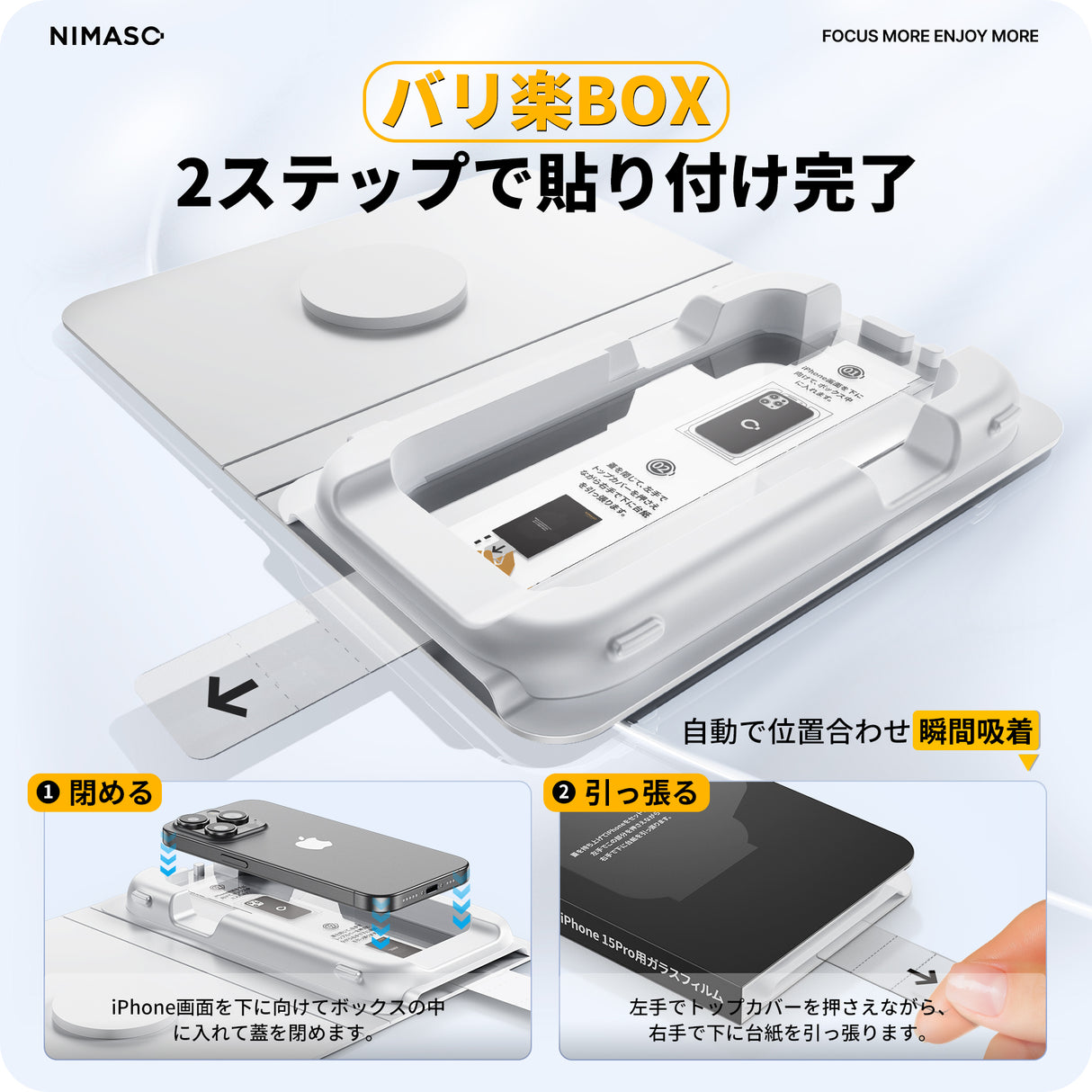
NIMASO "BariRaku Box" Tempered Glass Film for iPhone 15/Pro/Pro Max (2-Pack)
[Just 2 steps, apply it in an instant without any gaps] NIMASO's latest design, the Bariraku Box, can be easily applied without the need for any additional tools.
[iPhone Glass Film] NIMASO's guide frame comes in three types! Introducing the features and usage of each type
A guide frame is essential for neatly applying a screen protector. In recent years, tools such as guide frames have evolved, making application easy even for first-time users. Using a guide frame allows you to perfectly align the film to your iPhone, minimizing misalignment and air bubbles. Choosing the right application guide frame for you is key to successful application. Currently, NIMASO offers three types of guide frames, making applying an iPhone screen protector incredibly easy. Which type is your preference?
Normal guide frame

- Features : The frame secures the iPhone for precise positioning. This is a traditional guide frame that has been highly praised by repeat customers for not requiring re-attachment.
-
How to use :
a. Attach the guide frame to the iPhone.
b. Peel off the adhesive side of the film and lightly place it on top of the iPhone screen, aligning it with the front camera.
c. Press lightly with your fingers to push out any air bubbles. - Paste video :
Automatic dust removal guide frame

- Features : Automatically removes dust. Easy to apply, perfect for busy people.
-
How to use :
a. Place the guide frame over the iPhone, aligning it with the orientation, and pull out the backing underneath while holding down the guide frame.
b. Once it is fully adhered, remove the guide frame and peel off the backing paper remaining on the surface to complete the application. - Paste video :
Bali Raku BOX

- Features : Full-coverage design makes it easy to apply even for first-time users. Recommended for those applying a glass film for the first time.
-
How to use :
a. Place your iPhone face down inside the guide box and close the lid.
b. While holding the top cover with your left hand, slowly pull the backing down with your right hand.
c. After a short time, open the lid and remove your iPhone. - Paste video :
[By type] How to choose the "iPhone film attachment frame" that's right for you
For those of you wondering, "Which film is best?", we've compared NIMASO's guide frames by type. Choose the one that's right for you.
- For those who are familiar with pasting stickers : The standard guide frame allows for simple and highly accurate pasting.
- For those who are not good at applying film : The automatic dust removal guide frame is ideal for those who want a quick and neat finish.
- For those who want something simple : The Baliraku Box provides full coverage to minimize the risk of failure.
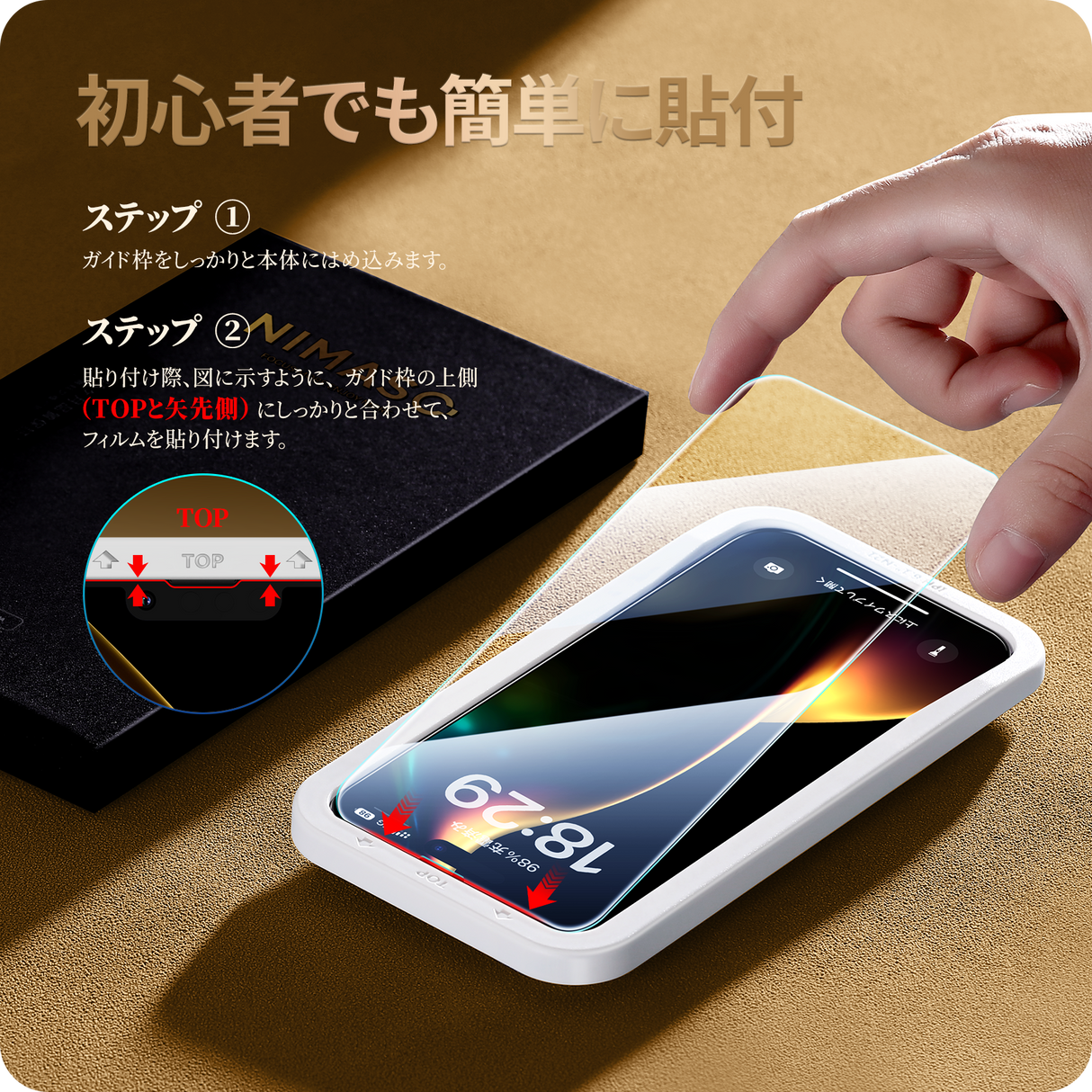
NIMASO Tempered Glass Film for iPhone 16e/14 Pro Max/14 Pro/14 Plus/14/13 Pro Max/13 Pro/13 mini/13, Black Borderless with Guide Frame (2-Pack)
The design leaves enough space around the edges of the iPhone to prevent interference with the case. Even if the case breaks, the shatterproof coating prevents glass shards from flying everywhere, ensuring safety.
[Things to note before purchasing] Checklist to avoid mistakes
To avoid any mistakes when applying the glass film, please check the following points beforehand.
- Check the model : Be sure to choose a film that matches your model, such as "iPhone SE Glass Film."
- Case compatibility : Choose a film with or without edges to prevent interference with the case.
- Camera protection : Purchase a set of iPhone camera film to protect the lens as well.
- Reliable Support : NIMASO Official Store offers a 12-month warranty and replacement for any defects.
[Summary] Make applying iPhone glass film more comfortable!
If you don't want to make any mistakes when applying your iPhone screen protector, we recommend NIMASO's guide frames! Choose the one that suits your style from the standard guide frame, automatic dust removal guide frame, or easy-to-apply box, and anyone can apply it easily and neatly.
Upgrade your iPhone life with NIMASO, which offers the ultimate protection and ease of use of a glass screen protector! Find the answer to your question: "Which screen protector is best?" Protect your screen with an iPhone glass screen protector and start enjoying a comfortable iPhone life.


1 comment
This guide is super helpful for anyone struggling with applying iPhone screen protectors! I like how you break down the different guide frames especially the Bali Raku Box for first-time users. Misalignment and dust are such common issues and having a frame that makes application neat and bubble-free is a game changer. The tips about case compatibility and camera protection are really practical too. NIMASOs approach of combining ease of use with strong tempered glass protection makes it easy to enjoy a safe and clear iPhone screen.