

The latest iPhone 17, due to be released in 2025, will not only boast significant hardware advancements but also enhanced AI functions and connectivity with various apps, making it a smartphone that will support student life more efficiently and enjoyably. It will be able to utilize note-taking, translation, voice memo, and time management apps that will be useful in class and assignments, as well as enjoy playing games and watching videos after school or on the commute.
It's also ideal for social media, an essential part of student life these days. Shooting and posting videos to TikTok and Instagram has become a part of everyday life for high school and university students, and the iPhone 17's high-performance camera and AI editing features fully support these creative activities. Balancing study and hobbies, academics and self-expression, you'll be able to enjoy a fulfilling campus life.
In this article, we will thoroughly explain specific ways to use the iPhone 17 and recommended features for both "improving study efficiency" and "using hobbies and social media" for Japanese junior high, high school, and university students.
🎟 Special Discount Now 🎟
Get 10% off with our special code!
✅ Copied!
table of contents
1. How to organize notes efficiently on iPhone 17
2. Language learning techniques using translation functions
3. Record notes so you don't miss anything in class
4. Optimize your study schedule with a time management app
5. Enjoy gaming: iPhone 17's high-performance CPU and high refresh rate
6. Express yourself through video viewing and shooting: High-quality video and AI editing features
7. FAQ for Students
Summary: Make your student life smarter with the iPhone 17
1. iPhone 17: Recommended for organizing notes! AI character recognition improves efficiency
Ideal for student note-taking. The latest AI character recognition (OCR) feature allows you to automatically save paper notes or blackboard notes as text data simply by taking a photo with your smartphone. Creating subject-specific folders for each class allows you to quickly find the notes you need, which is extremely convenient before tests and when submitting assignments. Cloud synchronization also allows you to share notes with friends and efficiently complete group assignments and projects. Handwritten diagrams and formulas can also be saved as images, ensuring thorough management of math and science lesson content. Furthermore, the high accuracy of AI character recognition and improved searchability allow you to instantly retrieve the information you need from a vast collection of notes. The iPhone 17 not only improves learning efficiency, but also supports student life as a convenient digital notebook for everyday use.
Usage examples
- Take a photo of your class notes and let AI automatically recognize and organize the text
- Divide your notes into folders by subject and instantly find the notes you need with the search function
- Cloud sync allows you to share notes with friends and streamline group assignments at university
2. iPhone 17: Recommended for studying! Smooth voice and image translation
The iPhone 17 is recommended for students who want to efficiently advance their language learning. Its enhanced AI translation function allows for smooth translation not only from text but also from voice and images. For example, simply take a photo of an overseas reference book or paper with the camera and it will instantly convert it into Japanese, allowing you to use it in class or assignments. It also provides real-time translation of phrases you didn't understand in English class, improving your comprehension. It's also useful for online English conversation and communication during study abroad, allowing you to enjoy conversations without feeling like a language barrier. The voice translation function also helps check pronunciation and improve listening skills. By using the iPhone 17, you can not only read textbooks and materials, but also practically improve your language skills, achieving both efficient and effective learning.
Usage examples
- Take a photo of a foreign textbook or paper and instantly translate it into Japanese
- Real-time translation of phrases you didn't hear in English class
- Smooth conversations through overseas exchange programs and online English lessons

NIMASO Tempered Glass Film for iPhone 17/Air/Pro/Pro Max with Black Border, Full Protection, Shockproof, and Guide Frame (2-Pack)
Just 3 steps - even beginners can apply it neatly. It doesn't interfere with the case, is shatterproof, and is fingerprint-resistant.
3. iPhone 17: Recommended for recording notes! Automatically transcribes all lecture content
Writing down everything that's said during a lecture or seminar can be a pain, but by combining the iPhone 17's recording memo function with AI voice recognition, you can automatically transcribe the lecture content. Recorded audio can also be searched for keywords later, allowing you to quickly review important points. Furthermore, by recording and sharing the content of group discussions and presentations, you can efficiently organize information with the entire team. You can also extract important parts of the lecture from the recording and compile them as smart notes, which is useful for reviewing and creating assignments. The iPhone 17 is more than just a recording device; it can also be used as a learning tool to maximize students' learning efficiency. It accurately records lecture content and supports organization and review, making it especially recommended for high school students and those preparing for exams.
Usage examples
- Lectures are recorded and automatically transcribed using voice recognition → Keywords can be searched later
- Record group discussions and share and organize the content
- Create smart notes by extracting key points from lectures
4. iPhone 17: Recommended for time management! Optimize your study schedule with AI
The iPhone 17 is ideal for students to manage their study schedules, with AI support for time management apps, calendars, and reminders. By inputting your exam plan into the app, the AI automatically calculates your progress and presents a reasonable study schedule. You can also set reminders for assignment submission deadlines to prevent forgetting and suggest short study sessions during commutes or free time. The iPhone 17 allows for flexible time management that suits your learning pace, helping you study more efficiently. Furthermore, by combining the smart notification feature and focus mode, you can optimize your smartphone usage while maintaining focus and focusing on your studies. This feature is highly recommended for students looking to maximize their study efficiency.
Usage examples
- Enter your study plan for the test period into the app → AI automatically calculates your progress
- Set reminders for assignment submission deadlines to prevent forgetting to submit
- Optimizing study time by utilizing commute time
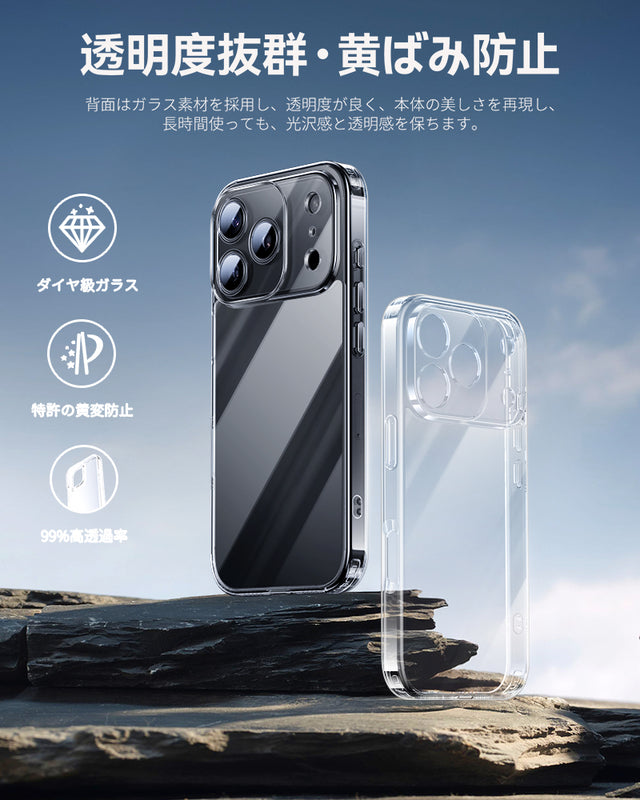
NIMASO Case for iPhone 17/Air/Pro/Pro Max, Clear Matte Tempered Glass, 9H Hardness, Impact Resistant, Anti-Yellowing
2025 Latest Improvements: Anti-yellowing Enhancement, Amazing Transparency, Reproduces the Beauty of the Original Product
5. Recommended for iPhone 17 games! 120fps support and comfortable gameplay experience
The iPhone 17 is a smartphone that allows you to comfortably enjoy not only your studies but also your gaming hobbies. The latest CPU and 120Hz high refresh rate display allow rhythm games and FPS games to run smoothly, maximizing control and realism. The improved cooling system also prevents performance degradation due to heat, even during extended play sessions, providing a stable gaming environment. It's easy to refresh during your commute or short breaks after school, and it's also comfortable for online battles and voice chats with friends. It's especially recommended for students who love gaming, as it can handle a wide range of games, from casual to esports. The iPhone 17's appeal lies in its ability to balance your studies and hobbies while enjoying stress-free enjoyment.
Game usage examples
- Smooth and comfortable tapping and operation even in rhythm games and FPS
- Casual games that can be played for a short time during your commute or breaks are stress-free
- Enjoy online battles with friends and have fun with voice chat
- E-sports games can be played stably at high frame rates
6. iPhone 17: Recommended for watching and shooting videos! Express yourself with high-quality images and AI editing
The iPhone 17's high-resolution display and AI editing features make watching and shooting videos a breeze. Enjoy YouTube and Netflix in high quality, and easily check out short videos for TikTok and Instagram. AI-powered image stabilization and automatic color correction allow even beginners to create professional-looking videos. Recorded videos are automatically organized into albums, and posting to social media is a snap. Easily share your daily vlogs, dance videos, and more, making it ideal for students to express themselves. The iPhone 17 allows you to efficiently pursue not only your studies but also your hobbies and social media activities, supporting a fulfilling student life.
Video viewing usage examples
- Watch lectures and hobby videos in high quality on YouTube and Netflix
- Easily check out short videos on TikTok and Instagram on your way to school
- Using automatic subtitles and translation functions, you can learn a language while enjoying entertainment
- Recommendation algorithms efficiently find content that's right for you
Video shooting usage examples
- Shoot high-quality vlogs and TikTok videos with the iPhone 17's high-performance camera
- AI-powered image stabilization and automatic color correction for professional results
- Automatically organize your videos into albums and post to social media with just one tap
- Easily edit popular dance videos and daily vlogs among high school and university girls
FAQ for Students
Q1. Which model (original, Air, Pro, Pro Max) do you recommend for students?
A. If you prioritize studying and everyday use, we recommend the lightweight and easy-to-use iPhone Air, and if you prioritize performance and gaming, we recommend the Pro or Pro Max. If you're on a budget, the standard model is sufficient, so you can choose the model that best suits your needs and lifestyle as a student.
Q2. Is it useful for studying?
A. Yes. The iPhone 17 is packed with features that will help you study efficiently for classes and tests, including note-taking, translation, audio recording, and time management apps. It's especially recommended for junior high, high school, and university students who want to improve their study efficiency.
Q3. Can I play the game comfortably?
A. Yes. The latest CPU and 120Hz high refresh rate display allow rhythm games and FPS games to run smoothly. In addition, the improved cooling system maintains stable performance even during long periods of play, making it a great choice for students who love games.
Q4. Does the battery last a day?
A. Yes. The iPhone 17 has a larger battery capacity than previous models, so you can enjoy online classes, watching videos, and playing games all day without worry. The iPhone 17 Pro Max in particular is expected to last up to approximately 28 hours of continuous use, making it ideal for long periods of study or hobby activities.
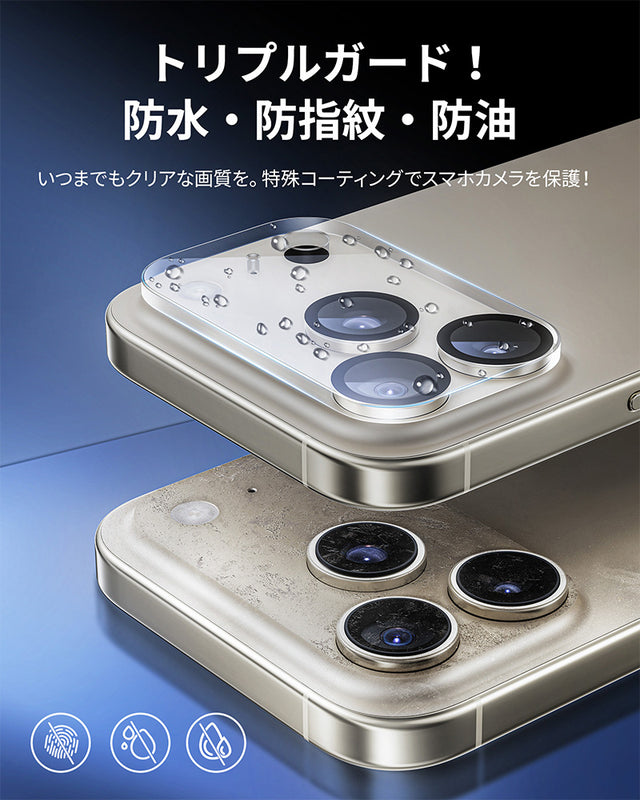
NIMASO Camera Film for iPhone 17/Air/Pro/Pro Max, Full Protection with Black Border and Guide Frame (2-Pack)
Full protection and dustproof effect. High transparency, does not affect photography. Resistant to fingerprints, water, and dirt.
Summary: Make your student life smarter with the iPhone 17
The iPhone 17 is a smartphone packed with a wide range of features that make student life more efficient and enjoyable, from study support functions like note organization, translation, audio memos, and time management to games, video viewing and photography, and social media use. Advanced support, including AI-based character recognition, voice translation, image stabilization, and automatic color correction, allows for stress-free study and hobbies. Its appeal is particularly evident for junior high, high school, and university students, as it allows for self-expression and refreshment while improving study efficiency. The iPhone 17 streamlines daily study and assignment management, while also allowing for comfortable enjoyment of hobbies like videos and games, enabling a smart and fulfilling student life.


